Cron, Repeat Day 1, Repeat Date
Attributes Cron, Repeat Day and repeat date can be used to get a suite running in real time mode.
Cron
The common use of cron is to repeat “house cleaning” tasks.
Since cron gets the task requeued as soon as it completes, no trigger can be defined based on such task. To circumvent this, a cron task typically retrieves the day and time of execution, and updates a variable used in a trigger by an external family.
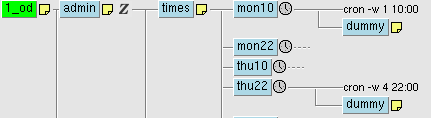
The following example shows the task /admin/times remembering the execution time
(by updating variables LAST_YMD and LAST_HMS),
so that the task /mofc/thu/01/ref can define a trigger, avoiding direct cron dependency.
 node=/%SUITE%/%FAMILY%/%TASK% %nopp ecflow_client --alter change variable LAST_YMD "$(date +%Y%m%d)" $node ecflow_client --alter change variable LAST_HMS "$(date +%H%M%S)" $node %end
node=/%SUITE%/%FAMILY%/%TASK%
%nopp
ecflow_client --alter change variable LAST_YMD "$(date +%Y%m%d)" $node
ecflow_client --alter change variable LAST_HMS "$(date +%H%M%S)" $node
%end
Repeat Day 1
A repeat day 1 attribute is used in a few suites, to progress each day.
When using this attribute, the day is incremented once all tasks are complete. In practice, this means there must be a task with a time attribute that ensure the suite does not loop before a given time. This also means that an aborted task, potentially causing others families/tasks to remain queued, prevents the entire suite from moving forward to the next day.
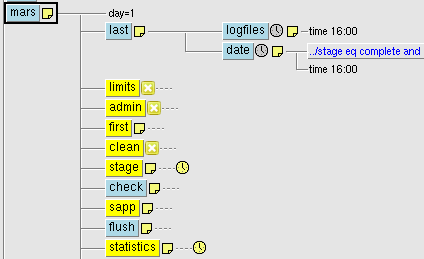 suite mars repeat day 1 family last task logfiles time 16:00 task date complete ../stage eq complete and ../check eq complete and ../sapp eq complete and ../statistics eq complete edit ECF_TRIES '1' time 16:00 endfamily # ...
suite mars
repeat day 1
family last
   task logfiles
      time 16:00
   task date
      complete ../stage eq complete and ../check eq complete and ../sapp eq complete and ../statistics eq complete
      edit ECF_TRIES '1'
      time 16:00
endfamily
# ...
Repeat Date
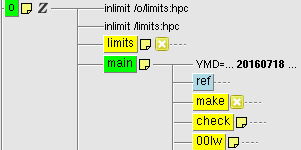
A repeat date attribute is frequently used to implement day iteration.
As this repeat is incremented once all families/tasks below are complete, a task with a time attribute will prevent the increment before a given time.
This is considered the most convenient to run a suite in real-time mode or catchup-mode. When in catchup-mode, the defstatus complete attribute inhibits the time dependency.
 family main repeat date YMD 20151118 20201212 1 family ref task dummy # defstatus complete # uncomment to shift to catchup-mode time 12:10 # ...
family main
repeat date YMD 20151118 20201212 1
family ref
   task dummy
      # defstatus complete # uncomment to shift to catchup-mode
      time 12:10
# ...