Status of a task
Each task in ECFLOW has a status. The status reflects the state the node is in. In the GUI the background colour of the text reflects the status.
The status of a task can vary as follows (default colours are shown):
After the load(CLI) command, the status of the tasks is unknown
After begin (CLI) command the tasks are either queued, complete, aborted, or suspended. A suspended task means that the task is really queued but it must be resumed by the user first before it can be submitted.
Once the dependencies are resolved a task is submitted by ECFLOW. The status is submitted or aborted (aborted, if scripts not found, variable substitution fails, or ECF_JOB_CMD failed.)
If the submission was successful, then once the job starts, it should become active, this achieved when the job calls: ecflow_client –init
Before a job ends it may send other messages to ECFLOW such as those shown below; these are referred to as child commands:
ecflow_client --event    # Set an event
ecflow_client --meter    # Change a meter
ecflow_client --label    # Change a label
ecflow_client --wait     # Wait for an expression to evaluate
ecflow_client --abort    # Send an abort message to the task
ecflow_client --msg      # Write a message line into ecFlow logfile
ecflow_client --status   # Checks task's status
Jobs end by becoming either complete or aborted by the job itself sending a message back to ECFLOW server. The complete is set by calling:
ecflow_client --completein the job file.
At any time the user can suspend a task. The task status is saved.
The above colours are the default, but they can be changed in the GUI. Fig. 1 below shows the normal status changes for a task with default colours:
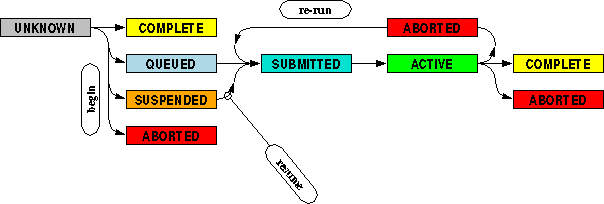
Fig. 1 Status changes for a task